
Shopify Product Page SEO: A Practical Optimization Guide
A practical, conversion-focused guide to Shopify product page SEO. Includes a product description template, image/alt-text checklist, and a simple on-page structure you can reuse across SKUs.
Most Shopify stores don’t have a “SEO problem.” They have a product page clarity problem.
When a product page underperforms, it’s usually one (or more) of these:
Google doesn’t understand what the page is about (thin, repetitive, or mismatched content)
Shoppers don’t trust the page enough to buy (missing proof, unclear shipping/returns, weak imagery)
The page is hard to use on mobile (slow, jumpy layout, messy sections)
This guide shows you how to optimize a Shopify product page for SEO and conversions without turning it into a novel.
What “Shopify product page SEO” actually means (in plain English)
For a product page, SEO is mostly about:
Helping Google understand the page (title, headings, descriptive content, internal links)
Avoiding duplicates (canonicals/variants handled correctly)
Making the page eligible for rich results where appropriate (structured data)
And product page conversion rate optimization is about:
Reducing uncertainty (trust + policy clarity)
Increasing relevance (benefit-led copy, right information order)
Removing friction (speed, mobile UX, clear CTAs)
If you do both well, your PDPs (product detail pages) can rank and convert.
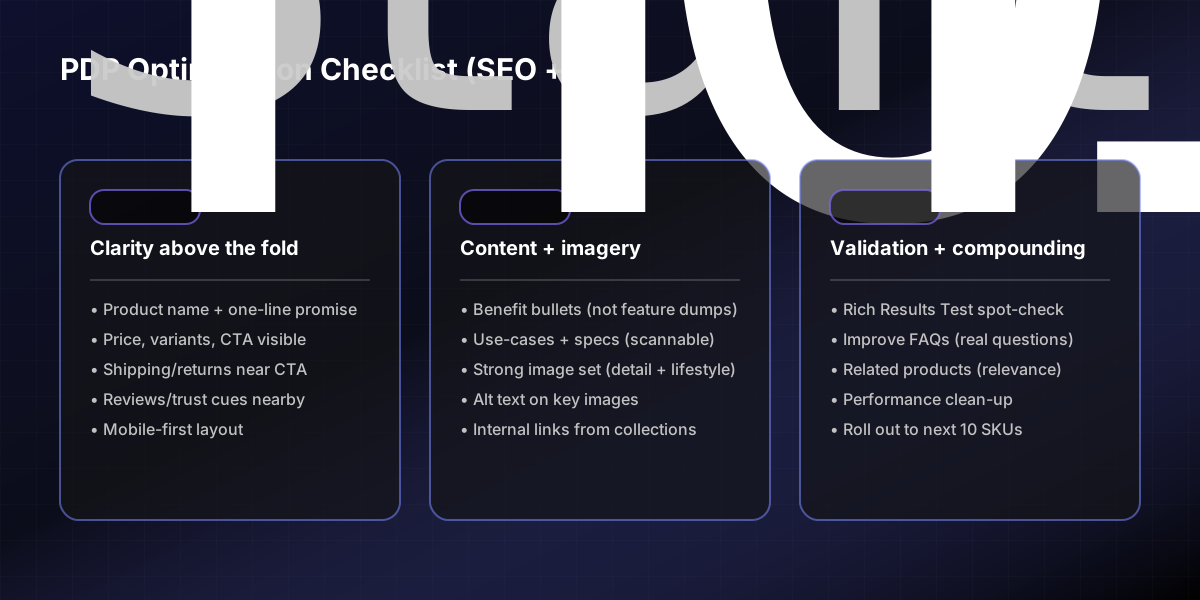
Step 0 — Pick 5–10 products to optimize first (don’t boil the ocean)
Start with the products that matter:
Bestsellers (highest revenue)
Highest margin products
Products with decent impressions but low clicks (Search Console)
Products with clicks but low conversion rate (Shopify analytics)
Baseline metrics to capture before you change anything:
Current title + meta description
Impressions/clicks (Google Search Console)
Conversion rate and add-to-cart rate (Shopify analytics)
PageSpeed Insights score + Core Web Vitals notes (mobile)
Step 1 — Fix your “above the fold” information order
This is the fastest conversion win and it supports SEO indirectly (better engagement, fewer bounces).
Above the fold (especially on mobile), aim for:
Clear product name (H1)
One-line value prop (who it’s for / what it does)
Price + key variant selection
Primary CTA (Add to cart)
2–4 trust cues (shipping estimate, returns, warranty, reviews)
Rule of thumb: if a shopper has to scroll to understand the offer, your conversion rate optimization will suffer.
Step 2 — Write a product title that matches how people search
For Shopify product page SEO, your product page title should be:
Specific (avoid generic “Product Name | Brand” only)\
Consistent with the product page content
Not misleading (Google can rewrite titles if they don’t match intent)
Practical approach:
Include the core product type + key attribute shoppers filter by
If relevant: material, size, compatibility, or use-case
Examples:
“Women’s Linen Wrap Dress (Summer Fit) | Brand”
“Rechargeable Camping Lantern (USB-C, 400lm) | Brand”
Step 3 — Use one clear H1 and a simple page structure
Most Shopify themes use the product title as the H1 (that’s fine). The bigger issue is the rest of the page:
Recommended structure:
H1: product name
Short intro (2–3 lines): benefit + who it’s for
“Why you’ll love it” (bullets)
Details/specs (scannable)
Shipping + returns
FAQs (if needed)
This helps both:
SEO (more descriptive, unique page text)
Conversion rate optimization (better scanning)
Step 4 — Use a repeatable product description template
If your product descriptions are inconsistent, your whole catalog becomes harder to optimize.
Use this template to write ecommerce product descriptions that convert:
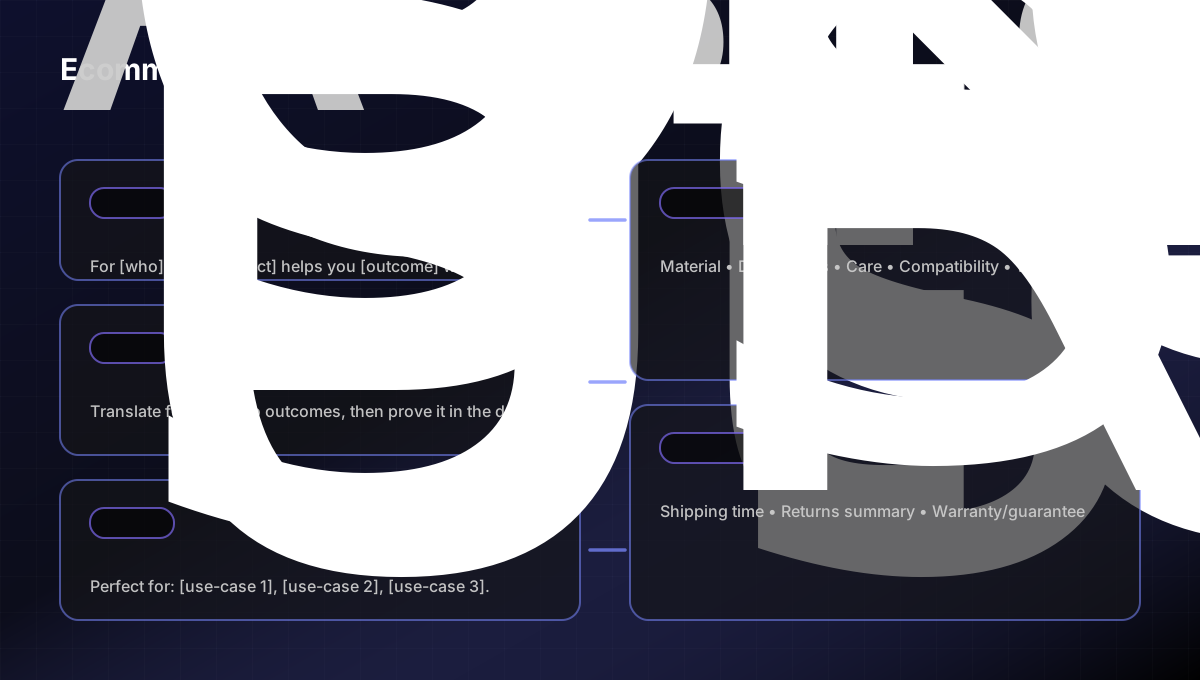
Copy/paste: Ecommerce product description template
Use this and fill in the brackets.
1) One-sentence promise
For [who], this [product] helps you [primary outcome] without [common pain].
2) 3–6 benefit bullets (not features)
[Benefit] (because [feature])
[Benefit] (because [feature])
[Benefit] (because [feature])
3) “Perfect for…” use-cases
[Use-case 1]
[Use-case 2]
[Use-case 3]
4) Key specs (scannable)
Material:
Dimensions:
Care:
Compatibility:
What’s included:
5) Risk reducers (trust)
Shipping time estimate:
Returns policy summary:
Warranty/guarantee:
Step 5 — Image SEO: filenames, alt text, and picking the right shots
Images are both:
A conversion tool (help shoppers “feel” the product)
A discoverability tool (image search + accessibility)
Shopify’s guidance for keywords includes writing helpful image alt text.
Alt text: write for humans first
Good alt text describes what’s in the image in plain language.
Good: “Black leather crossbody bag with gold zipper and adjustable strap”
Not great: “crossbody bag purse women's leather best price”
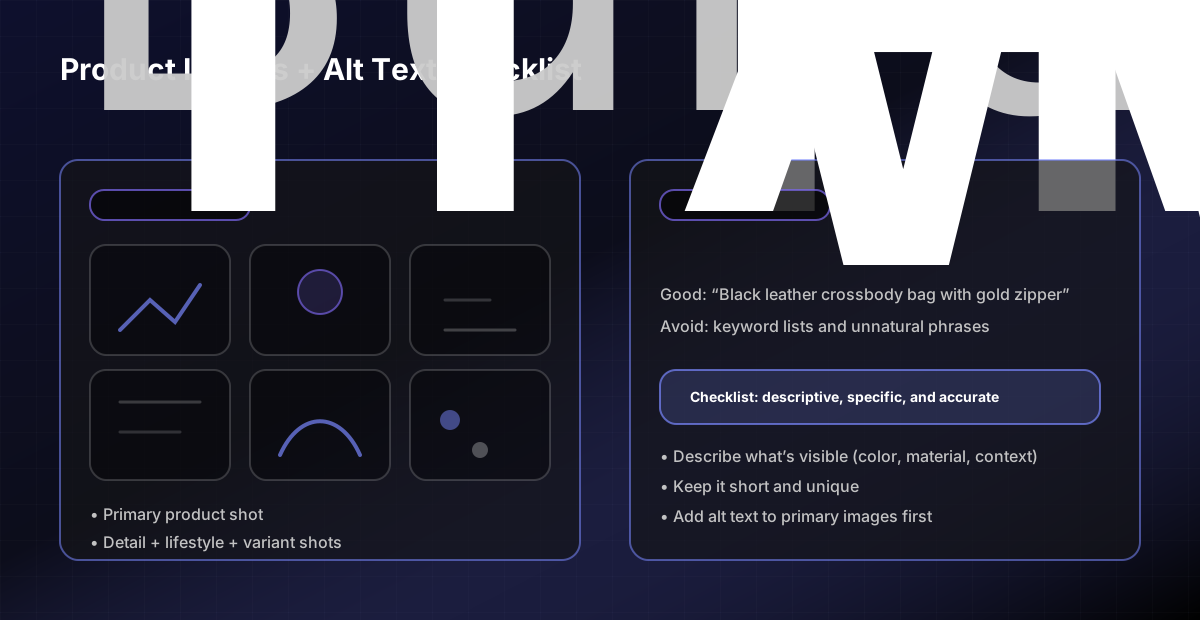
Copy/paste: PDP image + alt text checklist
Primary image clearly shows the product (clean, well-lit)
1–2 detail shots (texture, stitching, materials)
1 lifestyle shot (scale/context)
If it’s wearable: at least one on-body shot
If variants matter: show each key variant clearly
Alt text exists for primary images and describes what’s shown
Step 6 — Add trust elements that reduce uncertainty
Conversion rate optimization on product pages often comes down to trust.
Add what your shoppers need to say “yes”:
Reviews (with real detail)
Shipping and returns clarity (near the CTA)
Warranty/guarantee (if you offer it)
Payment badges (don’t overdo it)
Product FAQs (only if they’re real questions)
Step 7 — Internal linking: help Google (and shoppers) find the product
Internal links are a simple SEO lever that also improves discovery.
Quick wins:
Link from your top collections to your top products
Add “pairs well with” / related products where it makes sense
Link from relevant blog posts to relevant product categories
Step 8 — Structured data: spot-check rich results eligibility
Many Shopify themes output product structured data automatically, but it’s worth testing.
Audit actions:
Run 1–2 product URLs through Google’s Rich Results Test
Fix blocking errors (price/availability mismatches are common)
Step 9 — Prioritize changes so you don’t create a Franken-page
Use this simple priority stack:
P0: Above-the-fold clarity (CTA, variants, shipping/returns visibility)
P1: Description improvements + better images/alt text
P2: Enhanced FAQs, related products, additional long-tail sections
If you want help implementing this across a catalog (without breaking the theme), this is the kind of work we do in our Shopify SEO and CRO engagements.
Related pages:
Next step
Pick your top 5 SKUs, apply this template, and re-check metrics in 2–4 weeks. If you want a second set of eyes on your PDP structure, copy, and theme constraints, reach out via the contact page.
Sources (primary)
Shopify Help Center: Adding keywords (titles, meta, alt text, H1): https://help.shopify.com/en/manual/promoting-marketing/seo/adding-keywords
Google Search Central: Title links (how titles appear): https://developers.google.com/search/docs/appearance/title-link
Google Search Central: Snippets/meta descriptions: https://developers.google.com/search/docs/appearance/snippet
Google Search Central: Structured data testing tools (Rich Results Test): https://developers.google.com/search/docs/appearance/structured-data/testing-tool
Google Search Central: Product structured data: https://developers.google.com/search/docs/appearance/structured-data/product
web.dev: Web Vitals overview + thresholds: https://web.dev/vitals/
FAQs
How to optimize Shopify product pages for SEO and conversions?
Start with clarity above the fold, then write a repeatable product description template, then improve images/alt text, then validate rich results eligibility. Optimize 5–10 products first, measure the result, then roll it out.
Do I need long product descriptions for Shopify product page SEO?
Not necessarily. You need enough unique, helpful content to describe the product, reduce uncertainty, and match search intent. Scannable structure usually beats walls of text.
What should I put in ecommerce product descriptions?
A clear promise, benefit bullets, use-cases, key specs, and risk reducers (shipping/returns/warranty). Keep it easy to scan.
Can small teams run SEO audits effectively?
Yes. A repeatable checklist and clear priority framework help small teams improve rankings without large SEO resources.