


How to Migrate to Shopify Without Losing SEO Traffic

Replatforming to Shopify doesn't have to tank your rankings. Follow this URL mapping and 301 redirect tutorial — plus a complete seo migration checklist — to protect your organic traffic.
Replatforming is one of the highest-risk moments in a store's SEO history. Done without a redirect plan, it's equivalent to deleting your site and starting from zero — every inbound link, every indexed URL, every ranking position can disappear in days.
Done correctly, a migrate to Shopify without losing SEO approach takes a single afternoon of preparation and can preserve close to 100% of your existing authority. The difference between the two outcomes is almost entirely a URL mapping and redirect problem — not a Shopify problem.
This guide walks you through the exact process: crawl your old site, map every URL to its Shopify equivalent, upload your Shopify redirects, validate the chain, and notify Google.
Why SEO Traffic Drops After Migration (and Why It Doesn't Have To)
When you move to Shopify, every page your old platform served at a specific URL must now exist at a Shopify URL. The two structures are rarely identical.
A WooCommerce store typically serves products at /product/blue-denim-jacket. Shopify serves them at /products/blue-denim-jacket. Without a redirect, Google follows the old URL, finds a 404, and begins removing that page from its index. Within 30–60 days, the rankings associated with that page are gone — and so is any link equity accumulated over years of backlinks pointing to it.
The solution isn't complicated, but it requires being systematic before launch day — not after.
Step 1 — Crawl and Export Every URL Before Launch Day
Before you touch the new Shopify store, you need a complete inventory of every URL on your existing platform that Google knows about.
Tools to use:
Screaming Frog SEO Spider (free up to 500 URLs): Crawl your live site and export all 200-status URLs
Google Search Console → Coverage report: Export every URL Google has indexed
Ahrefs or Semrush Site Audit: Cross-reference for any crawled pages missed by Screaming Frog
Export to a spreadsheet. The output should be three columns:
Old URL (full path) | HTTP Status | Monthly Impressions (from GSC) |
|---|---|---|
/product/blue-denim-jacket | 200 | 1,240 |
/category/mens-clothing | 200 | 3,800 |
/about | 200 | 210 |
Sort by monthly impressions descending. Pages with high impression counts are your highest-priority redirects — if you run out of time, redirect these first.
Step 2 — Map Every URL to Its Shopify Equivalent
Shopify uses a fixed URL structure. You cannot change it without theme hacks that introduce their own risks. Know it before you map:
Page type | Shopify URL pattern |
|---|---|
Products | /products/[handle] |
Collections | /collections/[handle] |
Blog posts | /blogs/[blog-name]/[post-handle] |
Pages | /pages/[handle] |
Home | / |
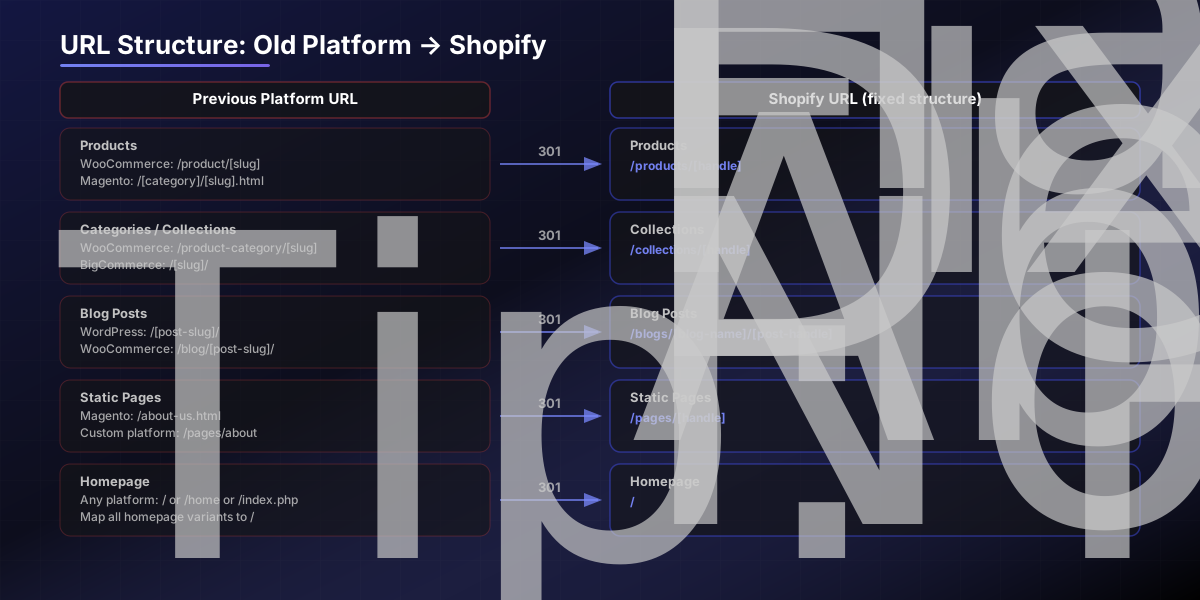
Handles are auto-generated from the product or collection title when you create them in Shopify. A product titled "Blue Denim Jacket" gets the handle blue-denim-jacket, producing the URL /products/blue-denim-jacket.
For each row in your spreadsheet, add a fourth column: New Shopify URL. Work through every product, collection, blog post, and static page. This is the mapping document that drives everything that follows.
Step 3 — Upload Your Shopify Redirects via CSV
Shopify has a native URL redirect manager under Online Store → Navigation → URL Redirects. For stores with more than a handful of redirects, the CSV import is the practical approach.
The format is simple — two columns only:
csv Redirect from, Redirect to /product/blue-denim-jacket,/products/blue-denim-jacket /category/mens-clothing,/collections/mens-clothing /about-us,/pages/about /blog/post-slug,/blogs/news/post-slug
Key rules for this CSV:
Redirect from must be the path only, not the full domain (e.g., /old-path, not https://oldsite.com/old-path)
Redirect to can be a path or a full URL — useful if you're also changing domains
All redirects Shopify creates through this tool are 301 (permanent) — which is what you want for SEO
Do not create a redirect from a URL that now returns a 200 — you'll confuse Googlebot
Upload the CSV, verify the count matches your mapping document, then do a spot-check of 10 random redirects before launch.
Step 4 — Flatten Any Redirect Chains
A redirect chain is when URL A redirects to URL B, which redirects to URL C. Each hop in the chain dilutes the link equity being passed. Three-hop chains lose a significant portion of the original page's authority.
This happens most often when:
You had redirects in place on the old platform (A → B), and B is now redirecting to C on Shopify
You've updated collection slugs since creating the initial redirect map

To audit for chains: after uploading your redirects to Shopify, run the list through a redirect checker (Screaming Frog's "List mode" works well for this). Any chain longer than one hop should be updated so A redirects directly to C.
This is especially important for your top-performing pages. A two-hop chain on a page with 50 high-authority backlinks pointing to it is quietly leaking ranking potential every day it runs.
Step 5 — Post-Launch: Tell Google What Happened
Redirects handle the link equity. Search Console handles the re-indexing timeline.
On launch day:
Submit your new sitemap — In Shopify, the sitemap is auto-generated at `yourdomain.com/sitemap.xml`. Submit it in Search Console under Indexing → Sitemaps.
Request indexing for your highest-priority pages — Use the URL Inspection tool in Search Console and click Request Indexing" for your homepage, top collections, and highest-traffic product pages.
If you also changed domains — Use the Change of Address tool in Search Console (Settings → Change of address). This sends a direct signal to Google that the migration is intentional and permanent, and typically cuts weeks off the re-indexing time.
In the first 30 days post-launch:
Monitor the Coverage report for 404 spikes — these indicate URLs you missed in your mapping
Check the Performance report weekly to watch impressions recover
Look for any 301 → 301 chain patterns that Screaming Frog didn't catch at launch
SEO Migration Checklist
SHOPIFY SEO MIGRATION CHECKLIST ─────────────────────────────────────────────────────────────
PRE-LAUNCH (complete before go-live)
[ ] Crawled existing site and exported all live URLs
[ ] Exported all indexed URLs from Google Search Console
[ ] URL mapping spreadsheet complete (old path → Shopify path)
[ ] Redirects CSV formatted and validated
[ ] Redirects uploaded to Shopify (Online Store → URL Redirects)
[ ] Spot-checked 10+ redirects manually in browser
[ ] Redirect chains audited and flattened to single hops
[ ] New sitemap URL confirmed (yourdomain.com/sitemap.xml)
[ ] Meta titles and descriptions recreated on all key pages
ON LAUNCH DAY
[ ] Verify old domain DNS is pointing to new Shopify store
[ ] Confirm SSL certificate is active on Shopify
[ ] Submit sitemap in Google Search Console
[ ] Request indexing for homepage + top 10 pages
[ ] Use Change of Address tool if domain also changed
POST-LAUNCH (first 30 days)
[ ] Monitor GSC Coverage report for new 404s weekly
[ ] Track impressions recovery in GSC Performance report
[ ] Fix any missed redirect mappings within 48 hours
[ ] Verify internal links updated to new Shopify URL structure
[ ] Confirm canonical tags are correct on duplicate-risk pages
─────────────────────────────────────────────────────────────
SEO traffic loss after a Shopify migration is preventable — but only if you treat the redirect work as a first-class task, not an afterthought. The URL mapping spreadsheet and CSV upload take a few hours. The traffic recovery from skipping them can take months.
If you'd rather have the migration handled end-to-end — URL mapping, redirects, Search Console setup, and post-launch monitoring included — our Shopify migration team has run this process for brands moving from Magento, WooCommerce, BigCommerce, and custom platforms. We also work with in-house teams who need a second set of eyes on a redirect map before they go live — contact us for a quick review, or see how past migrations held their rankings.