

Shopify Migration Checklist: What to Do Before, During, and After Launch

A phase-based Shopify migration checklist for 2026: what to do before, during, and after launch so you can migrate to Shopify without losing SEO, tracking, or revenue.
Shopify Migration Checklist: What to Do Before, During, and After Launch
Most replatform projects fail for one boring reason: the launch checklist lives in someone’s head.
A Shopify migration isn’t just “move products over.” It’s an ecommerce replatforming project with three critical systems that must survive the move:
SEO (URLs, redirects, indexation, internal linking)
Revenue UX (navigation, collections, PDP merchandising, promos)
Measurement (analytics, pixels, conversion tracking)
This guide is a phase-based Shopify migration checklist you can reuse. It’s designed to help you migrate to Shopify with fewer surprises and a calmer launch week.
Quick definitions (so we’re aligned)
Migration: moving from another platform (or an old Shopify build) to a new Shopify theme/store setup.
Replatforming: migration + changes to information architecture, design, and systems (apps, ERP, subscription, etc.).
Launch: the moment the new storefront becomes the live experience for customers.
If your project includes major catalog changes, new subscription tools, or new fulfillment rules, treat it as full ecommerce replatforming (not a “theme refresh”).
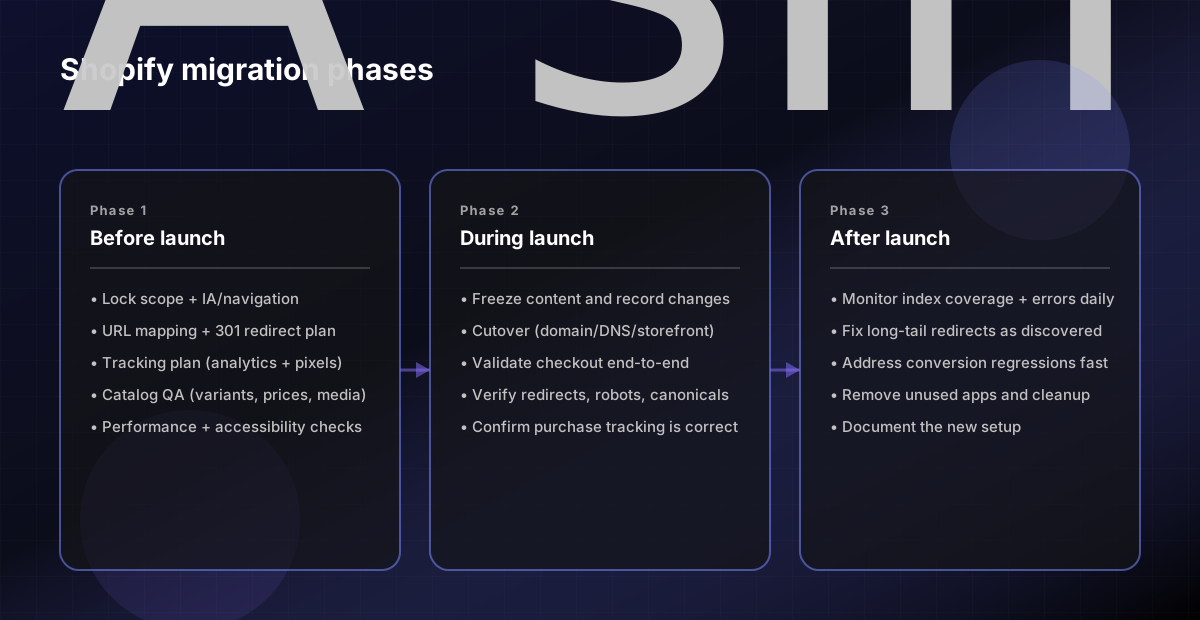
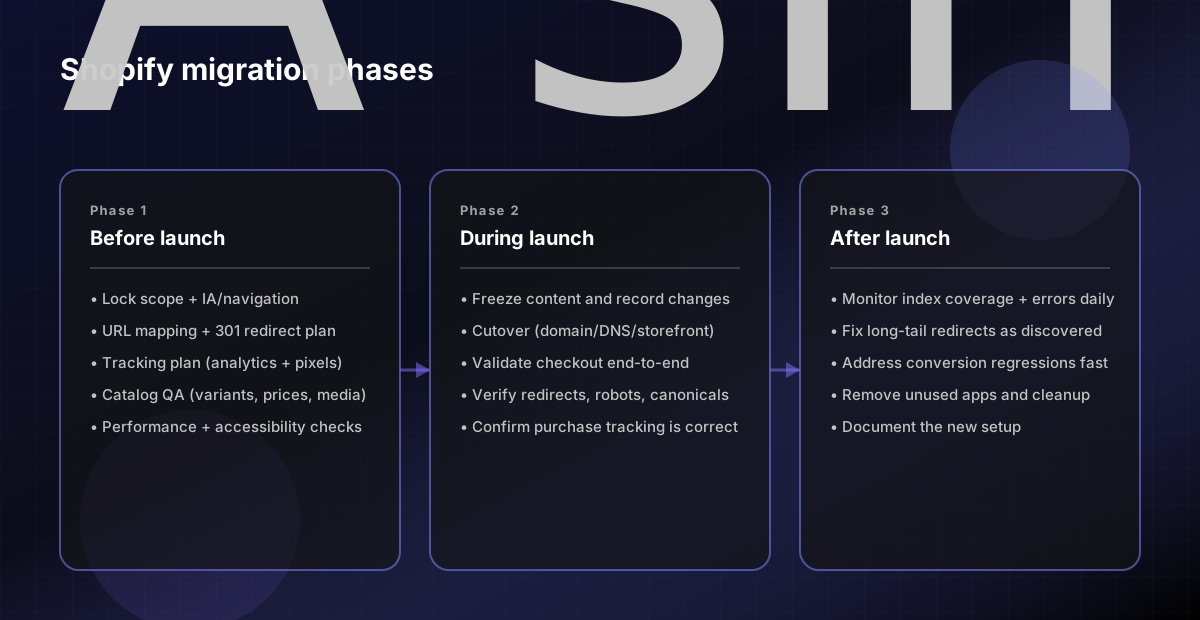
The 3-phase model (before / during / after)
Use a simple phase model so nothing falls through the cracks:
Before launch: planning + mapping + build + QA
During launch: cutover + validation
After launch: monitoring + fixes + cleanup
Before launch checklist (the work that prevents disasters)
This is where you prevent SEO loss, tracking gaps, and broken customer flows.
1) Confirm scope (what is changing, what is not)
Write down:
What’s in-scope: theme, navigation, PDP template, collections, apps, checkout customizations
What’s out-of-scope: features you’re explicitly not building now
What must be identical on day 1: pricing rules, promos, shipping thresholds, tax settings
Rule: if you can’t describe it, you can’t QA it.
2) Inventory every page type that matters for SEO and revenue
Make a list of your top URLs and page templates:
Home
Top collections
Top products (PDPs)
Blog / guides
Policy pages
Search / filters
Export your current “money pages” list from analytics (top landing pages + top revenue pages). That becomes your launch validation set.
3) URL mapping + redirect plan (this is the SEO center of gravity)
If URLs will change, you need a redirect map.
Minimum redirect mapping columns:
Old URL
New URL
Redirect type (301)
Notes (why changed)
QA status
Common mistakes:
Redirect everything to the home page
Redirect discontinued products to unrelated categories
Forget collection URLs and blog paths
4) Confirm information architecture (IA) and navigation
Navigation changes are revenue changes.
Before you build:
Lock your primary nav and collection structure
Decide how you’ll handle faceted navigation (filters)
Ensure collection “parents” are coherent (avoid duplicates/near-duplicates)
If you’re unsure, keep IA changes small in the first launch. Big IA changes + platform change increases risk.
5) Tracking plan (don’t wait until launch day)
Write a tracking checklist for:
Analytics (GA4 or equivalent)
Ad pixels (Meta, Google Ads, TikTok, etc.)
Server-side tracking if you use it
Consent banner behavior
Key principle: if you can’t measure purchases, you can’t debug a revenue dip.
### 6) Data migration validation (catalog integrity)
Before cutover, validate:
- Product titles, descriptions, pricing, variants - Inventory and fulfillment settings - Collection membership rules - Media (images/video)
Pick 20 representative SKUs (simple, variant-heavy, bundles) and QA them end-to-end.
7) Performance + accessibility sanity checks
You don’t need perfection, but you should avoid obvious regressions:
Mobile LCP/INP/CLS on your key page types
Broken layout at common breakpoints
Unreadable contrast or missing focus states
If you already have a performance baseline from your old site, compare against it.
During launch checklist (cutover + validation)
Launch is a sequence, not a single click.
1) Freeze content and track last-minute changes
Stop new content edits (or document them)
Record final redirects and IA changes
Capture “before launch” analytics snapshots
2) Cutover steps (high level)
Exact steps vary by platform, but the idea is consistent:
Point the domain/DNS (or switch storefront)
Confirm SSL and canonical domain behavior
Confirm robots and indexing behavior
3) Launch-day validation checklist (copy/paste)
Use this on launch day (and again 24–72 hours later).
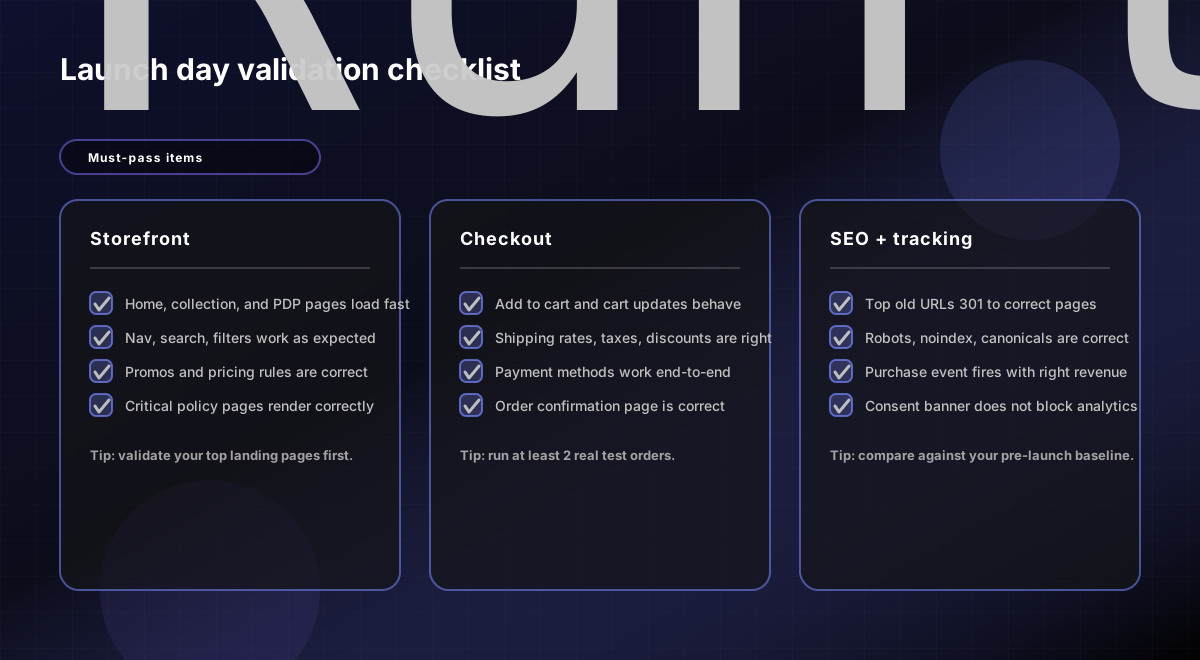
Must-pass items:
Home, top collections, top products load fast on mobile
Add to cart works; checkout completes
Prices, shipping, and taxes behave correctly
Tracking: purchase event fires and revenue is correct
Redirects: top old URLs resolve correctly (301 to the right destination)
Noindex/robots are correct (you did not accidentally block revenue pages)
After launch checklist (stabilize + protect SEO)
The first two weeks after launch are where you catch what QA missed.
1) Watch SEO signals daily for 7–14 days
Monitor:
Index coverage (errors, excluded pages)
Crawl/redirect issues
Sudden traffic drops on your top landing pages
Expect some volatility. The goal is to quickly identify:
Broken redirects
Wrong canonicals
Accidental noindex
2) Fix the “long tail” redirects
Your initial redirect list usually covers the top pages. After launch, you’ll discover:
Old blog URLs from years ago
Campaign landing pages
Parameterized URLs
Add redirects as you find them.
3) Address conversion regressions
If conversion drops, look for:
Unexpected changes in shipping/taxes
Missing trust elements (reviews, policies)
Slower PDP performance
Broken promos or discount logic
Make small, reversible changes first.
4) Remove or consolidate what you don’t need
After the site is stable:
Remove unused apps
Consolidate duplicate sections/templates
Document the new system so future updates are safer
Simple timeline: ecommerce replatforming without panic
A practical timeline for many projects:
Week 1: scope, IA, redirect plan, tracking plan Weeks 2–3: theme/build + data migration + QA cycles Week 4: launch + post-launch monitoring and fixes
The more systems you change (subscriptions, ERP, multi-currency), the more time you should allocate.
FAQs
How do I migrate to Shopify without losing SEO?
Use a redirect map for any URL changes (301s), validate canonicals/robots/noindex on launch, and monitor index coverage after launch. Most SEO losses come from missing redirects, wrong canonicals, or accidental blocking.
What should be in a Shopify migration checklist?
At minimum: scope, URL mapping/redirects, IA/navigation, tracking plan, data validation, launch-day QA, and post-launch monitoring.
How long does ecommerce replatforming take?
It depends on complexity. A focused migration can be 2–4 weeks; complex replatforming (new IA, subscriptions, integrations) often needs more time for QA and stabilization.
Related pages
Sources (primary)
Google Search Central: site move / URL change guidance: https://developers.google.com/search/docs/crawling-indexing/site-move-with-url-changes
Google Search Central: redirects and canonicalization (overview): https://developers.google.com/search/docs/crawling-indexing/301-redirects
Shopify Help Center (general docs hub): https://help.shopify.com/
FAQs
How do I migrate to Shopify without losing SEO?
Preserve URL structure where possible, map redirects carefully, migrate metadata, validate internal links, and benchmark rankings before launch so you can catch traffic losses quickly.
What should I check before launching a Shopify migration?
Confirm redirects, analytics, tracking, product data, collections, search, checkout, payment settings, and core templates before going live. Launch problems usually come from missed details, not the platform itself.
How long does a Shopify migration usually take?
Timelines vary by catalog size, integrations, and design complexity, but most migrations take several weeks to a few months when content, redirects, QA, and launch planning are included.